탑뷰 T1으로 AI 룩북 영상 만드는 법 (프롬프트 전문)
이 글은 Topview와 함께한 광고 협업 가이드입니다. 글 안의 링크로 가입하면 혜택이 적용될 수 있습니다.
요즘 X에서 100만 명이 넘게 본 부업이 있어요. AI로 만든 인물에게 코디를 입혀 룩북 릴스를 올리고 댓글을 단 사람에게 착장 링크를 DM으로 보내는 방식이에요. 그 링크로 구매가 일어나면 에이블리·무신사 같은 쇼핑몰에서 수수료가 들어오는 구조라, AI 인물 하나로 꾸준히 수익화하는 계정들이 생기고 있어요.
이번 영상의 룩북은 탑뷰에서 GPT Image 2로 코디 사진 6장을 만들고 그 6장을 새 영상 모델 Topview T1에 한 번에 넣어 만들었어요. 이 가이드에 제가 쓴 프롬프트를 전부 그대로 넣어 뒀으니 붙여넣고 옷만 바꿔 보세요.
▶ 탑뷰 T1 바로가기
1. 첫 코디 사진 만들기 (GPT Image 2)
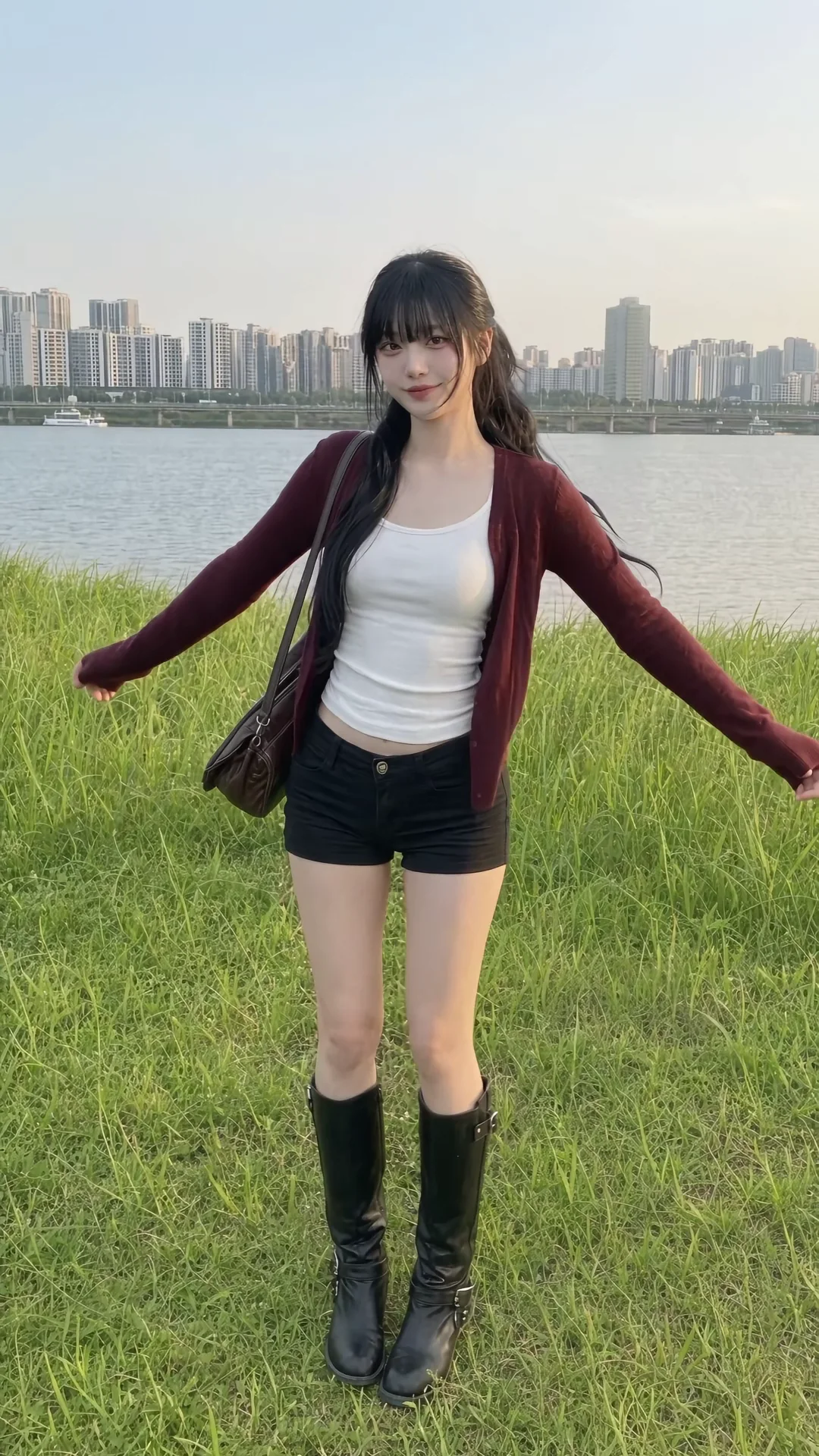
탑뷰의 AI Image에서 모델을 GPT Image 2로 바꾸고 비율은 9:16으로 맞춰요. 첫 사진에서 인물 얼굴과 장소가 정해지기 때문에 이 한 장이 제일 중요해요. 실제 아이폰으로 찍은 것처럼 보이게 빛, 피부 질감, 촬영 거리를 같이 적어 주는 게 핵심이에요.
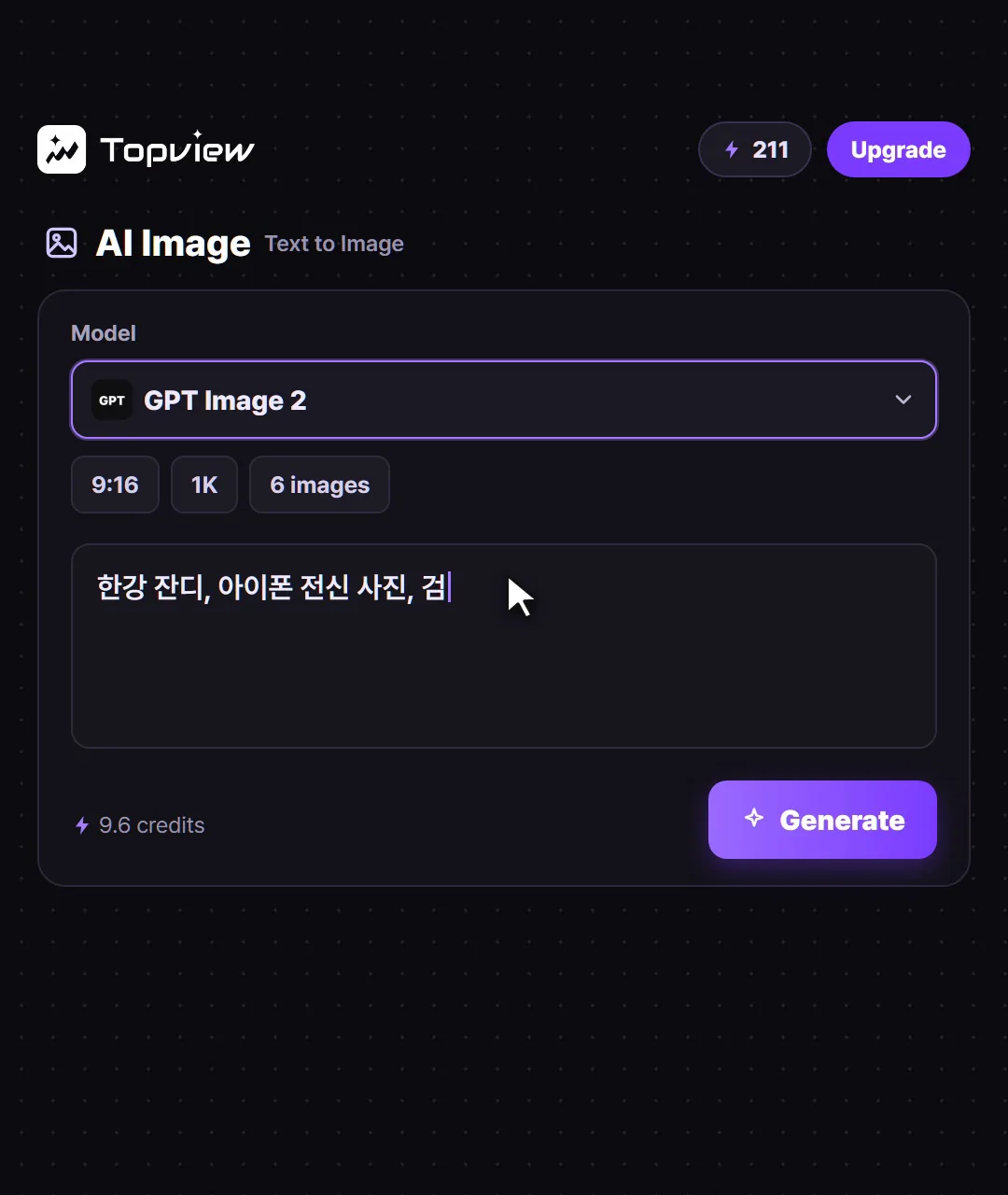
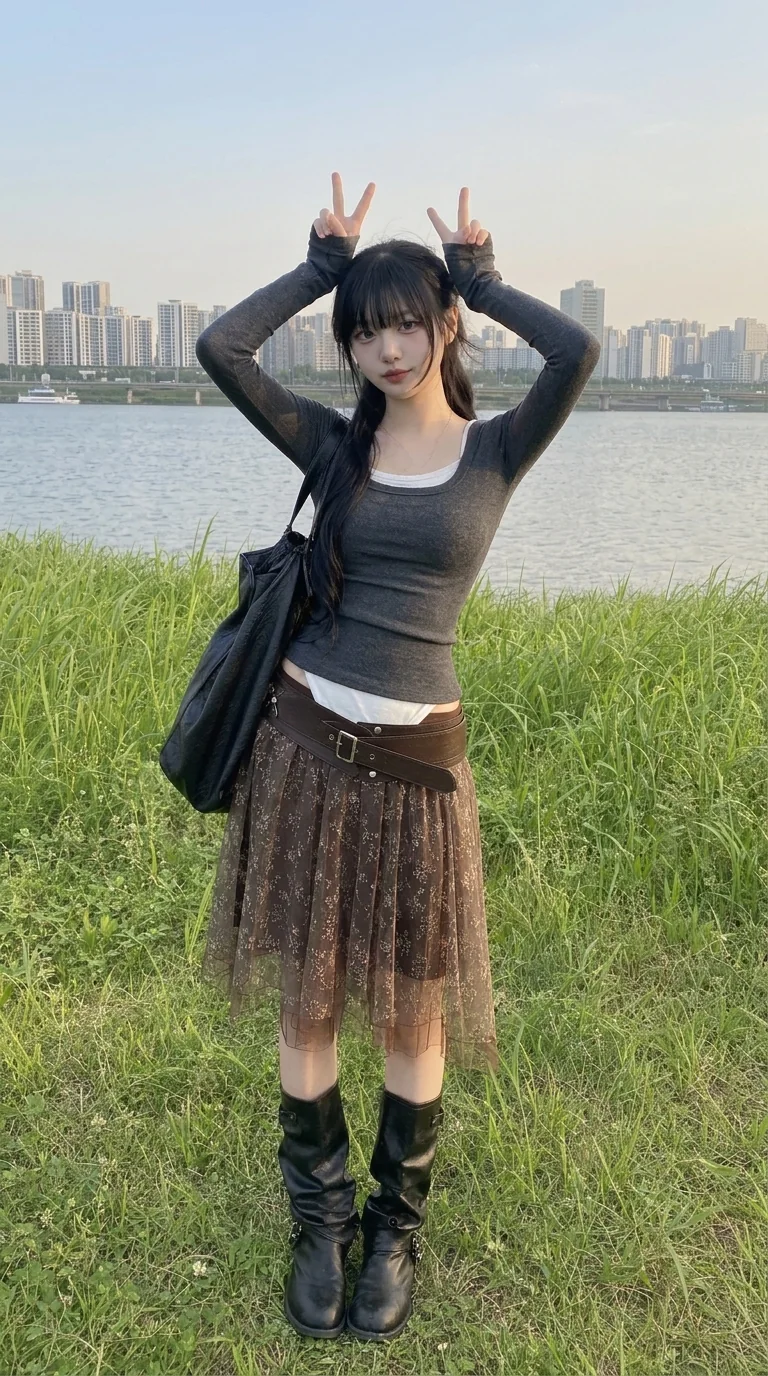
제가 첫 사진을 만들 때 넣은 프롬프트예요. 4장을 뽑아서 얼굴과 손이 가장 자연스러운 한 장을 골랐어요.
Ultra-realistic smartphone photo, vertical 9:16, looks like a real Instagram outfit reel frame shot on an iPhone by a friend. Natural soft overcast daylight, slight phone-camera sharpening, true-to-life skin texture with fine pores, no beauty filter look, no CGI look.
A slim Korean woman in her early 20s, 163cm, pale fair skin, long straight jet-black hair with thick blunt bangs, half-up low ponytail with loose strands framing her face, delicate face with calm doe eyes, light natural makeup, slightly pouty expression.
She stands full body in the center on tall green grass at the Han River park in Seoul, river behind her and a hazy skyline of apartment towers across the water, camera at chest height, full body visible from head to boots with a little space above her head.
Outfit: charcoal grey fitted long-sleeve top layered over a white tank top showing at the neckline, a wide brown leather belt worn low on the hips, a brown floral tulle midi skirt with layered sheer hem, slouchy black leather knee boots, a large black slouchy shoulder bag. Playful pose: both hands raised beside her head like bunny ears, looking at the camera.
No text, no logos, no watermark.
2. 같은 인물로 코디 5벌 더 만들기
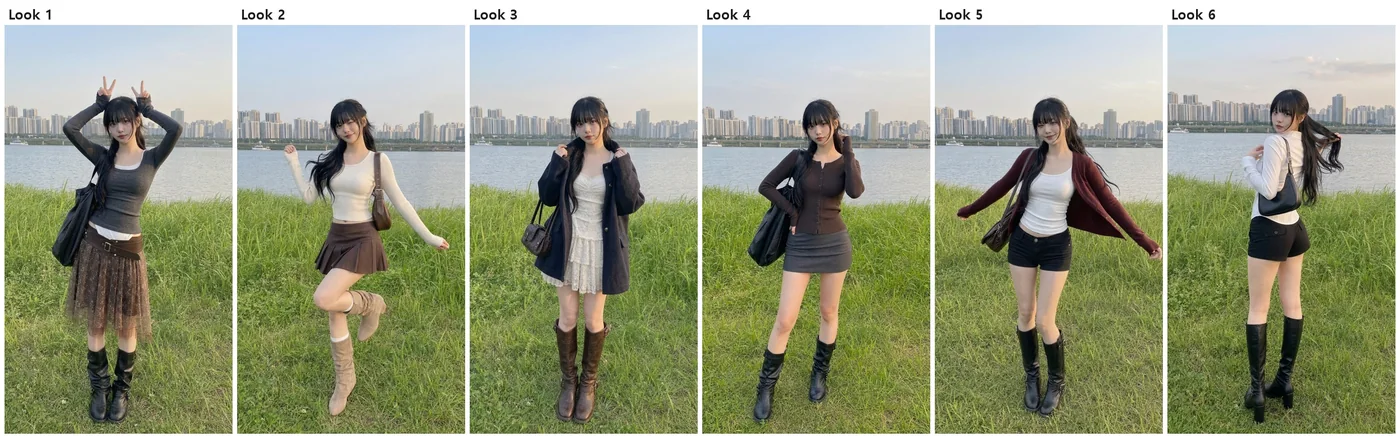
첫 사진을 참고 이미지로 넣고 옷과 포즈만 바꾸는 프롬프트를 써요. 앞부분은 같은 인물과 같은 장소를 지키라는 지시라서 그대로 두고, 아래 Look 부분만 바꿔서 5번 돌리면 돼요.
공통 앞부분이에요.
Keep the exact same woman from the input photo: same face, same long jet-black hair with blunt bangs and half-up low ponytail, same body proportions. Keep the exact same place, Han River grass with the apartment skyline across the water, same overcast daylight, same camera height and full-body framing, same realistic iPhone photo look. Only change the outfit and pose.
코디별로 뒤에 붙인 부분이에요. 끝에는 No text, no logos, no watermark.를 함께 넣었어요.
New outfit (Look 2): cream fitted knit long-sleeve top with a slightly cropped hem, chocolate-brown pleated mini skirt, beige suede slouchy mid-calf boots with white socks peeking out, a brown leather shoulder bag. Pose: mid dance move, one knee lifted, arms swinging playfully, hair moving slightly, cheerful face.
New outfit (Look 3): oversized dark navy wool jacket worn open over an ivory lace tiered mini dress, brown leather knee boots, small brown bag. Pose: both hands holding the jacket collar, leaning slightly toward the camera with a playful pout.
New outfit (Look 4): dark brown fitted ribbed cardigan buttoned up, charcoal grey mini skirt, black leather slouchy knee boots, black shoulder bag. Pose: one hand on her hip, the other touching her hair, weight on one leg, cool confident face.
New outfit (Look 5): burgundy cropped cardigan worn open over a white fitted tank top, black mini shorts, black leather knee boots, brown leather shoulder bag. Pose: mid twirl, arms out to the sides, cardigan flaring, smiling with eyes half closed.
New outfit (Look 6): crisp white fitted button-up shirt slightly tucked in, black mini shorts, black heeled knee boots, black mini shoulder bag. Pose: hair flip with one hand, other hand on the bag strap, looking back at the camera.
빛을 조금 더 따뜻하게 하고 싶으면, 완성된 사진을 한 장씩 넣고 이 프롬프트로 톤만 바꿔 주면 돼요. 저는 Nano Banana 2.1로 돌렸어요.
Keep this photo exactly as it is: same woman, same face, same hair, same outfit, same pose, same hand positions, same Han River grass, same skyline, same framing and camera position. Do not change any person, clothing or composition.
Only adjust the light and color slightly warmer: change the flat grey overcast look into a soft late-afternoon light, a few hours before sunset. The sky becomes light hazy blue with a faint warm tint near the horizon, gentle warm sunlight on her face and clothes, slightly warmer greens on the grass, subtle soft shadows. Keep it natural and mild like a real iPhone photo, not a strong golden hour, not orange, not saturated.
No text, no logos, no watermark.
▶ 탑뷰에서 GPT Image 2로 코디 만들기
3. 6장을 T1에 한 번에 넣어 룩북 영상 만들기
AI Video에서 참고 이미지 6장을 한 번에 올리고 모델을 Topview T1으로 바꿔요. 저는 1080p, 12초, 9:16으로 뽑았어요. 사진마다 영상을 따로 만들 필요 없이 한 번에 12초짜리 룩북이 나와요.
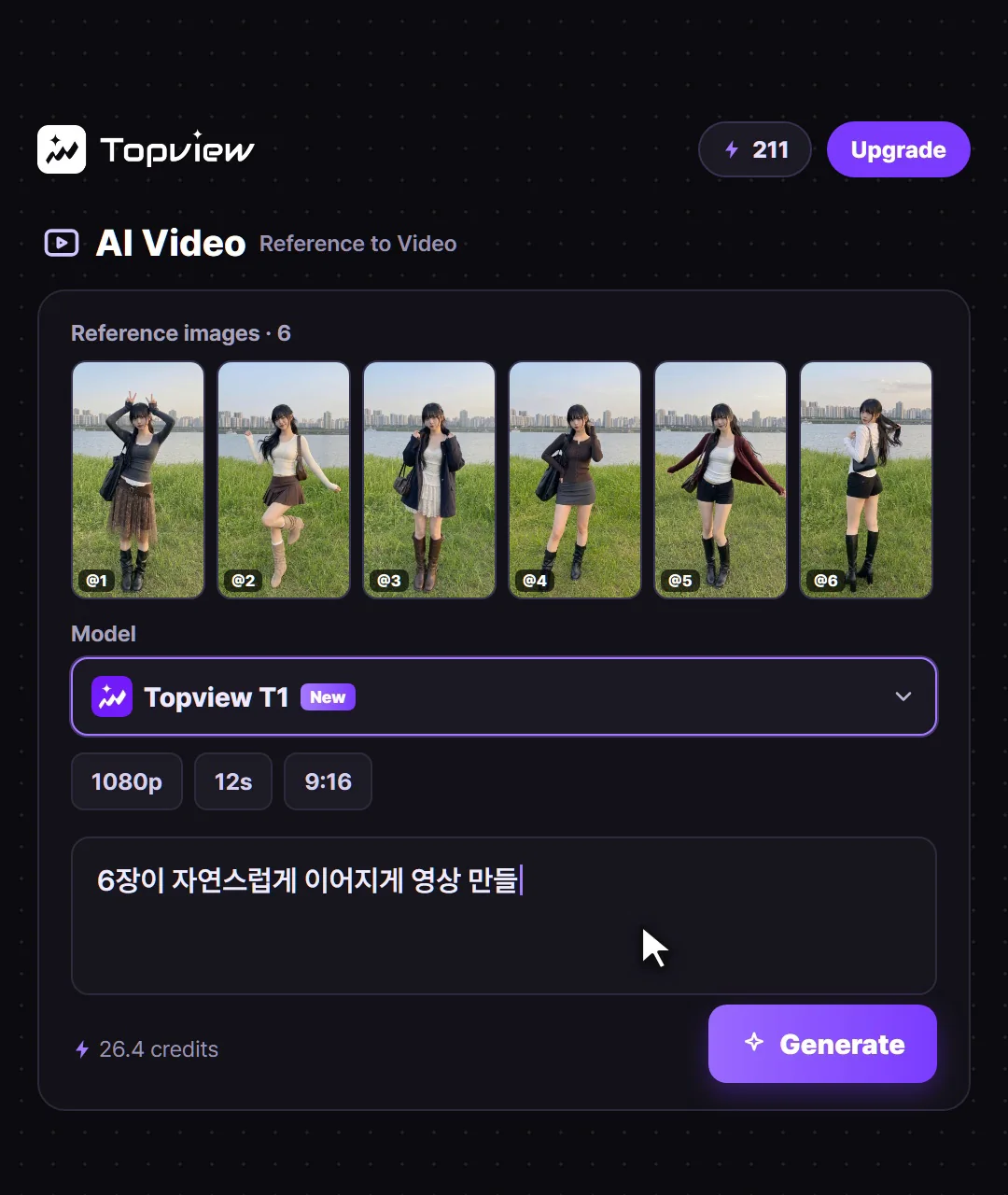
영상 프롬프트 전문이에요. 2초마다 어느 사진의 옷을 입을지 적고, 사진은 옷과 얼굴만 참고하라고 적은 게 핵심이에요. 이렇게 쓰면 춤은 계속 이어지고 옷만 박자에 맞춰 바뀌어요.
Realistic vertical iPhone outfit reel at the Han River: the same woman, same face, same black hair with blunt bangs, same grass, river and apartment skyline, same soft warm late-afternoon light as the reference images. Camera locked on a tripod, a bit farther back than the reference photos: her whole body from head to boots fills about two thirds of the frame height, with sky above her head and grass visible below her feet for the entire video. No zoom, no camera move.
She dances one continuous, energetic, cute K-pop style choreography for the full 12 seconds without ever stopping or resetting: bouncy steps, arm swings, small kicks, hip sways, hair flips, playful hand gestures toward the camera. The dance flows on through every outfit change.
On the beat every 2 seconds her outfit switches instantly, like a match cut, while her body keeps moving in the same position and motion: 0-2s wearing exactly the outfit of <<<Image1>>>, 2-4s exactly the outfit of <<<Image2>>>, 4-6s exactly the outfit of <<<Image3>>>, 6-8s exactly the outfit of <<<Image4>>>, 8-10s exactly the outfit of <<<Image5>>>, 10-12s exactly the outfit of <<<Image6>>>.
Use the reference images only for her face, hair, outfits and the place; do not copy their poses. Each outfit is complete and unchanged within its 2 seconds, never mix clothes between outfits. Natural hands and legs. No text, no captions, no logos, no music.
탑뷰 화면에서는 참고 이미지 이름이 Image1부터 Image6까지 순서대로 붙어요. 프롬프트의 <<<Image1>>> 자리가 첫 번째 사진이에요.
▶ 탑뷰 T1으로 룩북 영상 만들기
4. 올리고 수익화하는 흐름
- 완성한 룩북 영상에 유행하는 음악을 깔고 위에 "POV" 한 줄과 Look 번호를 넣어 릴스로 올려요.
- 에이블리 크리에이터나 무신사 크리에이터에 가입해서 영상 속 옷과 비슷한 상품 링크를 받아 둬요.
- 댓글을 남기면 착장 정보와 상품 링크를 DM으로 보내도록 자동 DM을 설정해요.
- 그 링크로 구매가 일어나면 수수료가 쌓여요.
코디 감각만 있으면 AI 인물 하나로 매일 새 코디를 올릴 수 있어요. 지금 바로 첫 코디부터 만들어 보세요!
▶ 탑뷰 T1 써보기
AI 사용법 가이드와 새 글, 강의 소식을 보내 드립니다. 새 소식이 있을 때만 보냅니다.
인스타그램 @biggie_ai 에서 새 가이드 소식을 가장 먼저 받아 보세요.